


Front View
|
|
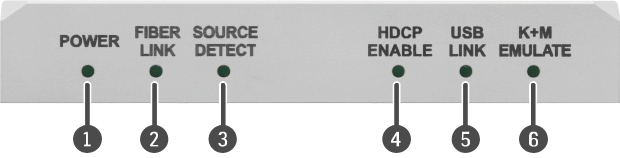
Power LED |
ON: the unit is powered on. BLINKING: an error has occurred and the device is out of normal operation, or it is in bootload mode (during firmware update) |
|
|
Fiber Link LED |
ON: the link is active between the extenders and ready to use. BLINKING: there is no connection between the extenders. |
|
|
Source Detect LED |
ON: a powered DP source is connected to the transmitter. BLINKING: an HDMI adaptor cable is connected to the receiver to indicate HDMI mode operation. |
|
|
HDCP LED |
ON: DP signal transmission is in progress or HDCP encryption is enabled during DVI/HDMI transmission. OFF: a DVI or HDMI display is connected to the receiver (via an adaptor cable) and HDCP is disabled (thus, the source is forced to send non-encrypted stream). For more information about the HDCP setting, see the HDCP Setting section. |
|
|
USB Link LED |
ON: HID extension is active. BLINKING: the USB channel is ready to use, but HID extension is not active (e.g. there is no USB HID device connected to the receiver or the computer is powered off). OFF: the USB channel between the extenders is not ready. |
|
|
K+M Emulate LED |
OFF: the transmitter is in transparent USB mode (default). BLINKING: the transmitter is in configuration USB mode; see the USB Modes section for more information |


Rear View
|
|
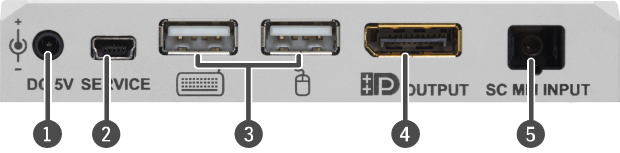
DC connector |
Connect the output of the supplied +5 V power adaptor. Lightware’s rack mountable power supply can also be used (PSU2x10-200 or PSU2x20-400). |
|
|
USB mini-B connector |
USB mini-B type connector for control functions (with Lightware Device Controller) and firmware update. |
|
|
USB-A ports |
Ports for USB HID (Human Interface Device, e.g. mouse, keyboard, or presenter) and USB HUB devices (e.g. keyboard with built-in USB HUB). Only HID devices are extended to the source computer. (The symbols are just recommendations; a mouse can be plugged into the port indicated with a keyboard-symbol and vice versa.) |
|
|
DisplayPort output |
DisplayPort 1.1a output connector for display devices with a DisplayPort connector. The applied DP-DP cable shall not be more than 2 m. DP adapters with DVI or HDMI connector are also supported. See the Introduction section for more information about the connector. |
|
|
SC Fiber connector |
SC fiber optical input connector. Connect to the transmitter by a single multimode fiber cable. |
