

Two channels are used for the USB communication between the extenders. Channel A1 is always transparent and one USB HID device is always operable. The other channel’s state can be set, which determines the current USB mode.
Transparent USB Mode
Both channels are available for USB HID devices connected to the receiver. The default setting is the transparent USB mode, which means both USB HID devices connected to the receiver are transparently transmitted to the source computer.
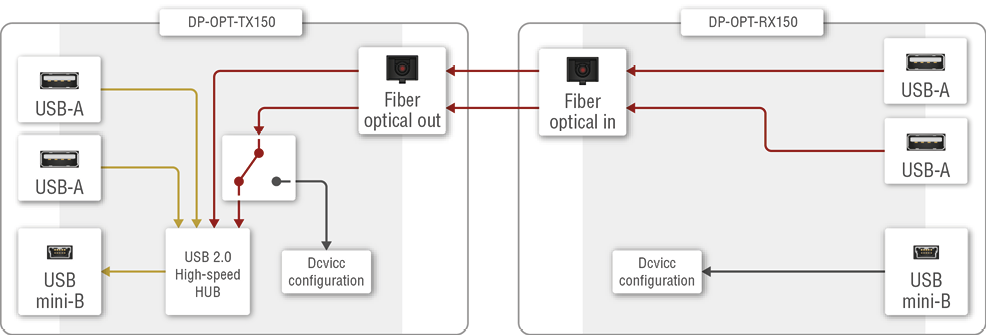
USB channels in Transparent mode
Configuration USB Mode
Configuration USB mode is an option where the USB settings of the extenders can be configured by using the Lightware Device Controller. One channel (A1) is available for a USB HID device, the other channel (A2) is reserved for communication.
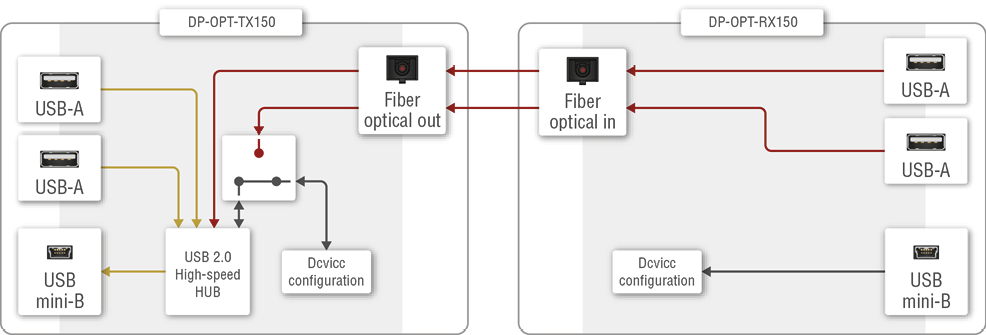
USB channels in Configuration mode
INFO:The USB mode has an effect only on the state of the transmitter. Receiver is always in configuration mode. Setting the USB mode on the receiver affects only the transmitter.
The USB mode can be changed in the transmitter or in the receiver, but in the latter case make sure that the extenders are linked by the fiber cables.
ATTENTION!If the USB mode is changed in the receiver when the extenders are not connected by fiber cable, the setting is stored in the receiver and the USB mode will be changed after reconnecting.
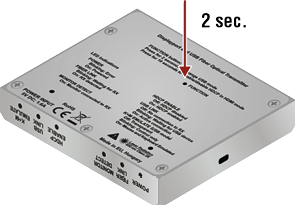
Step 1.Power ON the extender(s) and locate the hidden function button on the bottom side.
Step 2.Press and keep pressing the button with a thin tool (e.g. paper clip) for about two seconds. Release the button before not more than five seconds.
Step 3.The current USB mode is visible on the front panel.
ATTENTION!When the configuration mode is active, only one USB HID device can be used: the one that was connected to the receiver first.
INFO:The default setting (transparent mode) is restored when the device is powered on.