
USER MANUAL

PRC-16-205
PRC-16-312
Rack mount cage
|
|
|
|
||
|
|
|


Class II apparatus construction.
The equipment should be operated only from the power source indicated on the product.
To disconnect the equipment safely from power, remove the power cord from the rear of the equipment, or from the power source. The MAINS plug is used as the disconnect device, the disconnect device shall remain readily operable.
There are no user-serviceable parts inside of the unit. Removal of the cover will expose dangerous voltages. To avoid personal injury, do not remove the cover. Do not operate the unit without the cover installed.
The appliance must be safely connected to multimedia systems. Follow instructions described in this manual.
Ventilation
For the correct ventilation and to avoid overheating, ensure enough free space around the appliance. Do not cover the appliance, leave the ventilation holes free and never block or bypass the ventilators (if there are any).
WARNING
To prevent injury, the apparatus is recommended to be securely attached to the floor/wall, or mounted in accordance with the installation instructions. The apparatus shall not be exposed to dripping or splashing, and no objects filled with liquids, such as vases, shall be placed on the apparatus. No naked flame sources, such as lit candles, should be placed on the apparatus.
Waste Electrical & Electronic Equipment (WEEE)

This marking shown on the product or its literature indicates that it should not be disposed with other household wastes at the end of its working life. To prevent possible harm to the environment or human health from uncontrolled waste disposal, please separate this from other types of wastes and recycle it responsibly to promote the sustainable reuse of material resources. Household users should contact either the retailer where they purchased this product or their local government office for details of where and how they can take this item for environmentally safe recycling. Business users should contact their supplier and check the terms and conditions of the purchase contract. This product should not be mixed with other commercial wastes for disposal.
Common Safety Symbols
|
Symbol |
Description |

|
Direct current |

|
Alternating current |

|
Protective conductor terminal |

|
Equipotential Connector |
.png)
|
On (Power) |
.png)
|
Off (Power) |

|
Double insulation |

|
Caution, possibility of eletric shock |

|
Caution |

|
Laser radiation |

|
Warning, Rotating fan |

|
Caution: for indoor use only |
Document Revision History
|
Rev. |
Release date |
Changes |
Editor |
|
v1 |
2026-04-17 |
Initial release. |
Laszlo Zsedenyi |
|
v2 |
2026-09-09 |
ToC correction. |
Laszlo Zsedenyi |
Contact Us
+36 1 255 3800
+36 1 255 3810
Lightware Visual Engineering PLC.
Gizella 51-57, Budapest H-1143, Hungary
©2026 Lightware Visual Engineering. All rights reserved.
All trademarks mentioned are the property of their respective owners.
Specifications are subject to change without notice.
Thank you for choosing Lightware’s Rack mount cage. In the first chapter we would like to introduce the device by highlighting the most important features in the sections listed below:
The PRC-16 series devices (Powered Rackmount Cage for 16 extenders; 5V / 12V power connector variants) are a rack mount cage accessory enclosing up to 16x optical or AV over IP (e.g. VINX and TPX series) extenders, or distribution amplifiers in any combination, also providing a power source for every installed device. Reliable, safe, and secure operation is assured by numerous built-in protections against short circuits and overloads.
Compatible Devices
The following table contains the compatible Lightware products that can be mounted to the PRC-16 series cage models:
|
Rackmount cage model |
Power inlet |
Extender model |
|
|
PRC-16-205 |
5V |
VINX-110-HDMI-DEC; VINX-120-HDMI-ENC |
|
|
HDMI-OPT-TX100; HDMI-OPT-TX100R; HDMI-OPT-TX200R; HDMI-OPT-RX100; HDMI-OPT-RX100R; HDMI-OPT-RX200R |
|||
|
HDMI-3D-OPT-RX150RA |
|||
|
PRC-16-312 |
12V |
HDMI-TPX-RX106 HDMI-TPX-RX106-V2 HDMI-TPX-RX107-V2 HDMI-TPX-TX106 HDMI-TPX-TX106-V2 HDMI-TPX-TX106A HDMI-TPX-TX106A-V2 HDMI-TPX-TX107-V2 HDMI-OPTX-RX100A HDMI-OPTX-RX100AU2K HDMI-OPTX-TX100A HDMI-OPTX-TX200AU2K |
HDMI-TPN-TX207AU2K HDMI-TPN-RX107AU2K HDMI-OPTN-TX100A HDMI-OPTN-TX200AU2K HDMI-OPTN-RX100A HDMI-OPTN-RX100AU2K |
|
HDMI-TPS-TX86 HDMI-TPS-RX86 HDMI-TPS-TX87 HDMI-TPS-RX87 |
HDMI-TPS-TX95 HDMI-TPS-RX95 HDMI-TPS-TX96 HDMI-TPS-RX96 HDMI-TPS-TX97 HDMI-TPS-RX97 |
||
About the Serial Number
Lightware devices contain a label indicating the unique serial number of the product. The structure is the following:

From 1st of October 2024, serial number format of Lightware devices is the following: the first two digits are of the year of manufacture, while the remaining digits make up the running sequence number.

The chapter is about the installation of the device and connecting to other appliances, presenting the mounting options:
2.1. Screw Types of the Powered Rackmount Cage
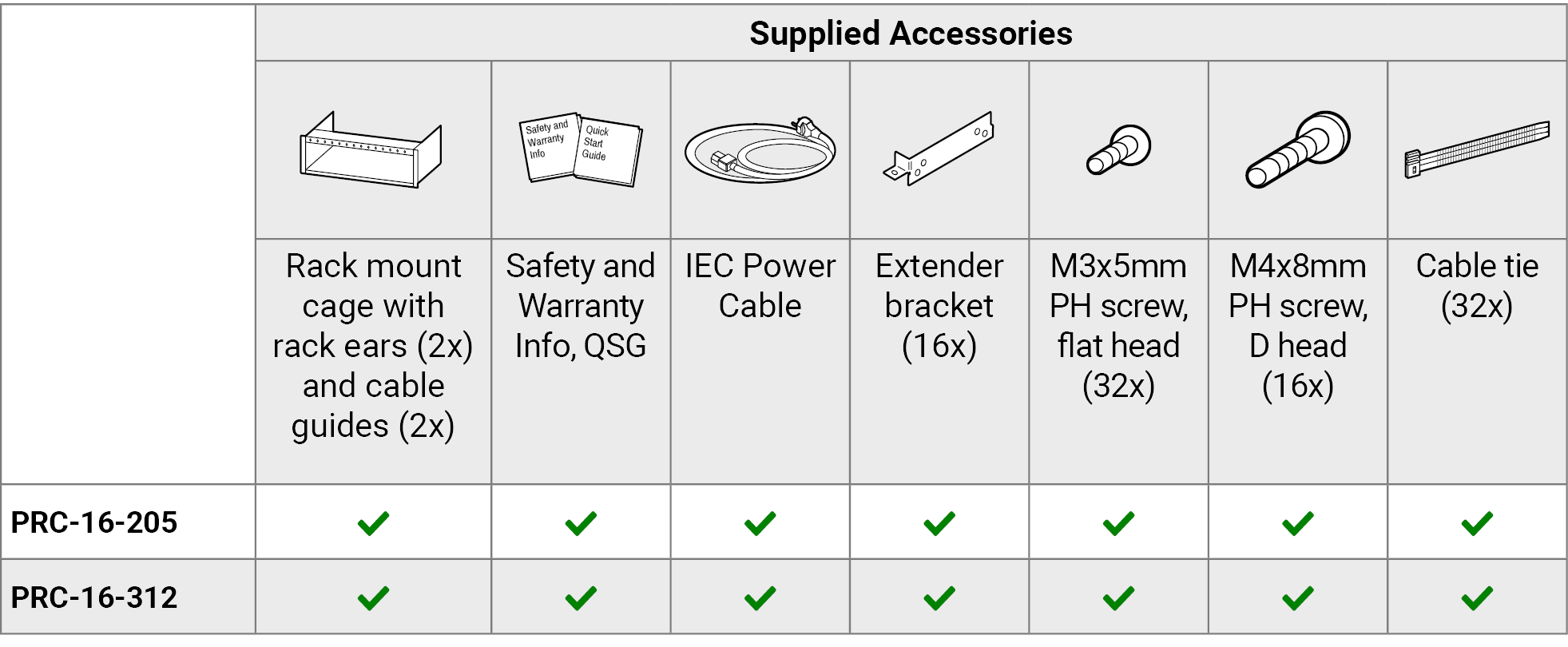
The device contains several different screw types. The following table makes a comparative list about the accessory and built-in screws of the cage.
|
M3x5, flat head, PH, black |
M3x6, flat head, PH, unpainted |
M4x8, flat head, Allen, black |
M4x8, D head, PH, unpainted |
|

|

|

|

|
|
|
Quantity |
32 pcs |
8 pcs |
8 pcs |
16 pcs |
|
Original location |
Supplied as accessory |
Assembled in the device |
Assembled in the device |
Supplied as accessory |
|
Required tool |
PH2 screwdriver |
PH1 screwdriver |
Allen key, 2.5 mm (7/64”) |
PH1 screwdriver |
|
Used for |
Fastening of the extender bracket to the extender |
Fastening of the cable guide to the enclosure or the rack ear |
Fastening of the rack ear to the enclosure |
Fastening of the extender with the bracket to the mounting slot |
WARNING!Always use the black M3x5 screws for fastening the bracket to the extender. Longer screws may damage the interior parts of the device.
2.2. Assembly Steps for the Mounting of the Extenders
The following step-by-step assembly guide helps install the signal extenders correctly.
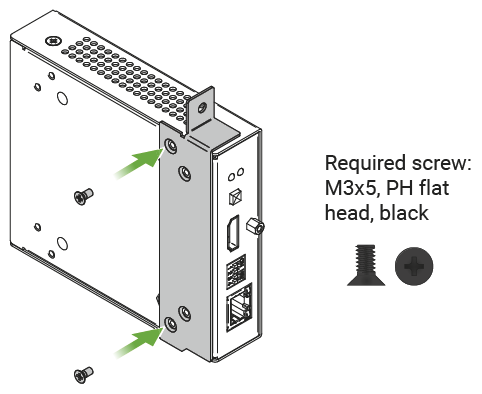
Step 1 - Assembly of the extender bracket.
Fasten the mounting bracket (highlighted with grey) onto the bottom of the extender with the provided M3x5mm PH flat head black screws (2 pcs per bracket) with a PH2 screwdriver.
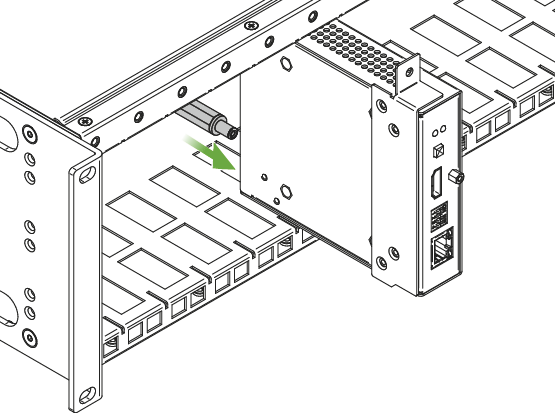
Step 2 - 5V / 12V DC power cable connection.
Pull out the 5V DC (in case of PRC-16-205) or 12V DC (in case of PRC-16-312) power cable (highlighted with grey) that belongs to the desired slot from the enclosure and connect it to the power connector of the extender.
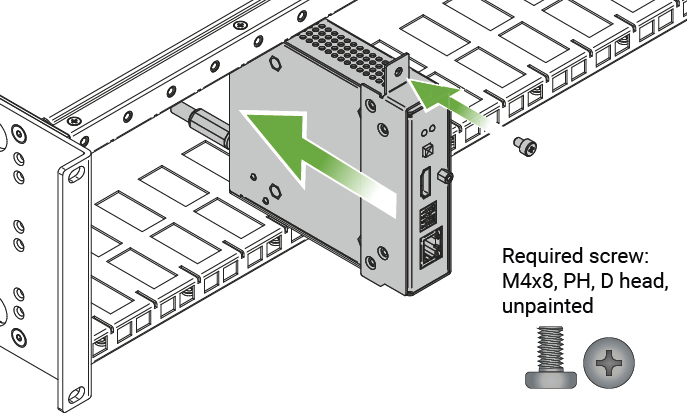
Step 3 - Fastening the extender in the mounting slot.
Place the extender (highlighted with grey) into the desired mounting slot and fasten the extender bracket with 1 pc M4x8mm PH D head unpainted screw with a PH1 screwdriver. Pay attention to the guide rails of the cage when placing the extender.
2.3. Assembly of the Rack Ears and the Cable Guides
The following typical application drawings demonstrate examples for three different installations of the rack ears and the cable guides in the Powered Rackmount Cage.
Figure 1 - Front Installation (Default State)
INFO:It is recommended if you have a shallow rack and all cabling is done on the rear side.
The rack ears (highlighted with blue) are fixed to the front side and they are positioned in line with the extenders. One cable guide (highlighted with green) is fixed to the rear side in the lower position.
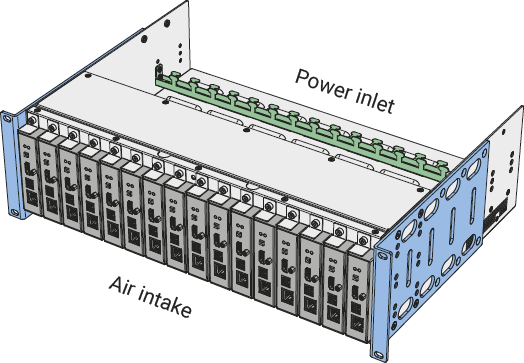
Figure 2 - Front and Rear Installation
INFO:It is recommended if you have a deep rack and you need cabling on the front and the rear side as well.
The rack ears (highlighted with blue) are fixed to the front side in the foremost position. Two cable guides (highlighted with green) are fixed to the device, one is to the front side in the middle position, the second one is to the rear side in the lower position.

Figure 3 - Rear Installation
INFO:It is recommended if you have a deep rack and all cabling has to be accessed from the front.
The rack ears (highlighted with blue) are fixed to the rear side in the rearmost position. Two cable guides (highlighted with green) are fixed to the rear side of the device in the middle position.

2.4. Transposition of the Rack Ears
The rack ears of the cage can be moved to various positions. One rack ear is built with 10 screw holes and the enclosure has 12 screw positions per side, which can provide several different positions of the device in the rack shelf - see examples in the Mechanical Drawings section.
The rack ears can be fixed on the front or the rear sides depending on the current usage of the extenders.
ATTENTION!Always fasten the rack ears with at least 4 screws per ear.
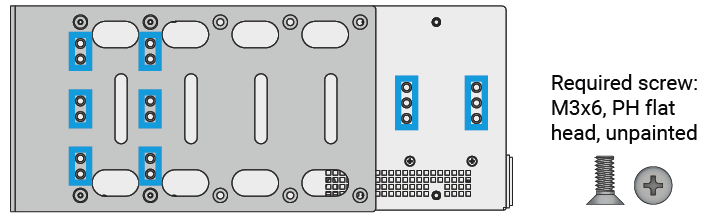
The screw holes of the enclosure (light grey) where the rack ears (dark grey) can be fixed are highlighted with blue on the side view figure below.

2.5. Transposition of the Cable Guides
The cage is assembled with 2 cable guides that can be moved to various locations in the enclosure for the most comfortable usage. The cable guides can be fixed to the enclosure and the rack ears as well in 10 different positions.
WARNING!Always fasten the cable guide with at least 4 screws per guide.
The screw holes of the enclosure (light grey) and the rack ears (dark grey) where the cable guides can be fixed are highlighted with blue on the side view figure below.
2.6. Adjusting the Length of the Cable Guide
The distances between the sides of the enclosure and the two rack ears are different. The length of the cable guide can be adjusted using the following method:
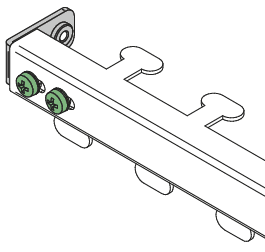
Step 1.Loosen (do not screw off) the two screws on the bottom of the cable guide (highlighted with green) with a PH1 screwdriver.
Step 2.Set up the length by moving the fastening part (highlighted with grey) to the left or right.
Step 3.Fasten both screws.
WARNING!Always use the unpainted M3x6 screws for fastening the cable guides to the enclosure or the rack ears.
There is a status LED located at the front side of the PRC:
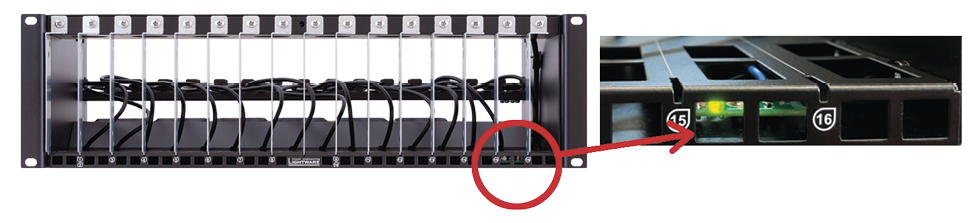
The LED shows the following states:
|
STATUS |
||

|
on (green) |
Device is powered on and operational. |

|
on (red) |
The power supply load is close to the allowed maximum value. It is highly recommended to decrease the load on the PSU. |
Tables, drawings, guides, and technical details as follows:
INFO:Specifications are subject to change without notice.
General
|
Compliance |
CE, UKCA |
|
EMC (Emission) |
EN 55032:2015+A1:2020 |
|
EMC (Immunity) |
EN 55035:2017+A11:2020 |
|
Safety |
EN 62368-1:2020 |
|
RoHS |
EN 63000:2018 |
|
Warranty |
3 years |
|
Operating temperature |
0 to +50°C (+32 to +122°F) |
|
Operating humidity |
10% to 90%, non-condensing |
|
Cooling |
Blowers (8x) |
|
Protection against |
Short circuit / Overload |
Enclosure
|
Rack mountable |
Yes, 3U high |
|
Material |
1.5 mm steel |
|
Mounting slots |
16 |
|
Dimensions with rack ears (mm) |
482.6W x 319D x 132.5H |
|
Dimensions with rack ears (inch) |
19W x 12.5D x 5.2H |
|
Dimensions with maximum depth (mm) |
482.6W x 454D x 132.5H |
|
Dimensions with maximum depth (inch) |
19W x 17.9D x 5.2H |
|
Dimensions of the rack ear (mm) |
20.3W x 235D x 132.5H |
|
Dimensions of the rack ear (inch) |
0.8W x 9.2D x 5.2H |
|
Net weight |
7.8 kg / 17.2 lbs |
|
Weight with loaded 16 extenders |
13.8 kg / 30.4 lbs |
Power
|
Power supply |
Internal |
|
Power source |
100-240 V AC 50/60 Hz |
|
Nominal power consumption - PRC-16-205 |
200 W |
|
Nominal power consumption - PRC-16-312 |
320 W |
5V DC Power Plugs - PRC-16-205
|
Plug type |
5V DC plug |
|
DC output voltage |
5 V |
|
Rated current per output port |
2.5 A |
|
Total DC output |
40 A |
12V DC Power Plugs - PRC-16-312
|
Plug type |
12V DC plug |
|
DC output voltage |
12 V |
|
Rated current per output port |
2.5 A |
|
Total DC output |
26 A |


The device contains a built-in temperature sensor (highlighted with green), which continuously controls the blowers based on the outer temperature.

WARNING!To ensure the correct device temperature control, do not cover the front panel.
To ensure the correct ventilation and avoid overheating, provide enough free space around the ventilation holes. The following cross-sectional view of the device shows the direction of the airflow (blue arrows).

3.5. Further Document Information
Symbol Legend
The following symbols and markings are used in the document:
WARNING!Safety-related information that is highly recommended to read and keep in every case!
ATTENTION!Useful information for performing a successful procedure; it is recommended to read.
DIFFERENCE:Feature or function that is available with a specific firmware/hardware version or product variant.
INFO:A notice, which contains additional information. Procedure can be successful without reading it.
DEFINITION:The short description of a feature or a function.
TIPS AND TRICKS:Ideas that you may have not known yet, but can be useful.
Navigation Buttons
|
Buttons in the PDF version |
Buttons in the HTML version |
|||
|
|
Navigate to the Table of Contents. |
|
Open the main Table of Contents. |
|
|
|
Go back to the previous page. If you clicked on a link previously, you can go back to the source page by pressing the button. |
|
Navigate to the Online User Manuals webpage. |
|
|
|
Navigate to the Bookmark page. |
|
Navigate to the Bookmark page in this User Manual. |
|
|
|
Visit www.lightware.com. |
|
Download the PDF version of the User Manual. |
|


About Printing

Lightware Visual Engineering supports green technologies and eco-friendly mentality. Thus, this document is made primarily for digital usage. If you need to print out a few pages for any reason, follow the recommended printing settings:
▪Page size: A4
▪Output size: Fit to page or Match page size
▪Orientation: Landscape
TIPS AND TRICKS: Thanks to the size of the original page, a border around the content (gray on the second picture below) makes it possible to organize the pages better. After punching holes in the printed pages, they can easily be placed into a ring folder.
3.6. Limited Warranty Statement
1. Lightware Visual Engineering PLC (Lightware) warrants to all trade and end user customers that any Lightware product purchased will be free from manufacturing defects in both material and workmanship for three (3) years from purchase unless stated otherwise below. The warranty period will begin on the latest possible date where proof of purchase/delivery can be provided by the customer. In the event that no proof can be provided (empty ‘Date of purchase’ field or a copy of invoice), the warranty period will begin from the point of delivery from Lightware.
1.1. 25G and MODEX product series will be subject to a seven (7) year warranty period under the same terms as outlined in this document.
1.2. If during the first three (3) months of purchase, the customer is unhappy with any aspect of a Lightware product, Lightware will accept a return for full credit.
1.3. Any product that fails in the first six (6) months of the warranty period will automatically be eligible for replacement and advanced replacement where available. Any replacements provided will be warranted for the remainder of the original unit’s warranty period.
1.4. Product failures from six (6) months to the end of the warranty period will either be repaired or replaced at the discretion of Lightware. If Lightware chooses to replace the product, then the replacement will be warranted for the remainder of the original unit’s warranty period.
2. The above-stated warranty and procedures will not apply to any product that has been:
2.1. Modified, repaired or altered by anyone other than a certified Lightware engineer unless expressly agreed beforehand.
2.2. Used in any application other than that for which it was intended.
2.3. Subjected to any mechanical or electrical abuse or accidental damage.
2.4. Any costs incurred for repair/replacement of goods that fall into the categories above (2.1., 2.2., 2.3.) will be borne by the customer at a pre-agreed figure.
3. All products to be returned to Lightware require a return material authorization number (RMA) prior to shipment, and this number must be clearly marked on the box. If an RMA number is not obtained or is not clearly marked on the box, Lightware will refuse the shipment.
3.1. The customer will be responsible for in-bound, and Lightware will be responsible for out-bound shipping costs.
3.2. Newly repaired or replaced products will be warranted to the end of the originally purchased product's warranty period.