



|
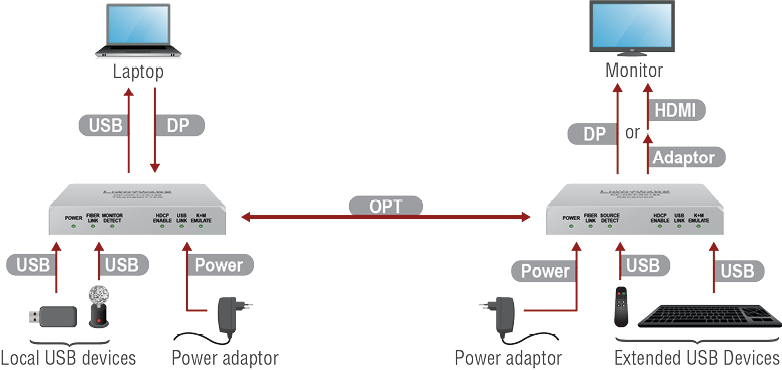
Connect the desired source to the DP input port of the transmitter. |

|
Connect the supplied USB cable between the transmitter and a computer to extend USB HID devices, to connect local USB devices, and/or to control the extenders by LDC. |
|
|
Connect the desired local USB devices to the Transmitter and USB HID devices to the Receiver for USB KVM extension. |
|
|
Connect a DP sink device to the Receiver by a DP cable or an HDMI sink device by an HDMI cable and a DP/HDMI adaptor cable. |

|
Connect a multimode fiber optical cable between the transmitter and the receiver. |

|
Connect the power adaptor to the DC input on the receiver first, then to the AC power socket, or use Lightware's rack-mountable Power Supply Units. |

