
USER MANUAL

C-PopUp-20RS
C-PopUp-20RB
Cable Management Tool
|
|
|
|
||
|
|


Important Safety Instructions
Class II apparatus construction.
The equipment should be operated only from the power source indicated on the product.
To disconnect the equipment safely from power, remove the power cord from the rear of the equipment, or from the power source. The MAINS plug is used as the disconnect device, the disconnect device shall remain readily operable.
There are no user-serviceable parts inside of the unit. Removal of the cover will expose dangerous voltages. To avoid personal injury, do not remove the cover. Do not operate the unit without the cover installed.
The appliance must be safely connected to multimedia systems. Follow instructions described in this manual.
Waste Electrical & Electronic Equipment (WEEE)
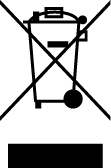
This marking shown on the product or its literature indicates that it should not be disposed with other household wastes at the end of its working life. To prevent possible harm to the environment or human health from uncontrolled waste disposal, please separate this from other types of wastes and recycle it responsibly to promote the sustainable reuse of material resources. Household users should contact either the retailer where they purchased this product or their local government office for details of where and how they can take this item for environmentally safe recycling. Business users should contact their supplier and check the terms and conditions of the purchase contract. This product should not be mixed with other commercial wastes for disposal.
Common Safety Symbols
|
Symbol |
Description |
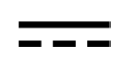
|
Direct current |
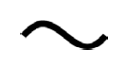
|
Alternating current |
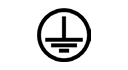
|
Protective conductor terminal |

|
Equipotential Connector |
.png)
|
On (Power) |
.png)
|
Off (Power) |
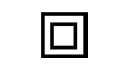
|
Double insulation |

|
Caution, possibility of electric shock |

|
Caution |

|
Laser radiation |

|
Warning, Rotating fan |

|
Caution: for indoor use only |
Document Revision History
|
Rev. |
Release date |
Changes |
Editor |
|
v1 |
2026-07-06 |
Initial release. |
Laszlo Zsedenyi |
|
... |
|||
|
v4 |
2026-09-25 |
20RB product variant added, Figures colored, Box contents updated. |
Laszlo Zsedenyi |
|
v5 |
2026-09-29 |
Drawing correction. |
Laszlo Zsedenyi |
Contact Us
+36 1 255 3800
+36 1 255 3810
Lightware Visual Engineering PLC.
Gizella 51-57, Budapest H-1143, Hungary
©2026 Lightware Visual Engineering. All rights reserved.
All trademarks mentioned are the property of their respective owners.
Specifications are subject to change without notice.
Thank you for choosing Lightware’s Cable management tools. In the first chapter we would like to introduce the device by highlighting the most important features in the sections listed below:
Thank you for choosing Lightware's C-PopUp cable management tool. This compact, push-to-open solution is designed for conference rooms and collaborative workspaces. C-PopUp keeps connections like USB-C, HDMI, and Ethernet easily accessible with retractable cables. Now with improved usability thanks to up to 330° cable-head access from almost any direction. With side access, the connectors are easier to pull out, while installation is simplified. Enhanced labeling and icon placement on the closing cover improves clarity. Ideal for BYOD environments, it ensures tidy cable handling and reliable long-term use. Customizable labeling options provide added flexibility for different setups.
Supplied Accessories
Optional Accessories
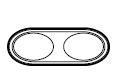
|
|
|
Double frame |
|
|
C-PopUp-20RS (silver) |
(silver) |
|
C-PopUp-20RB (black) |
(black) |


This chapter is about the phisycal installation of the product.
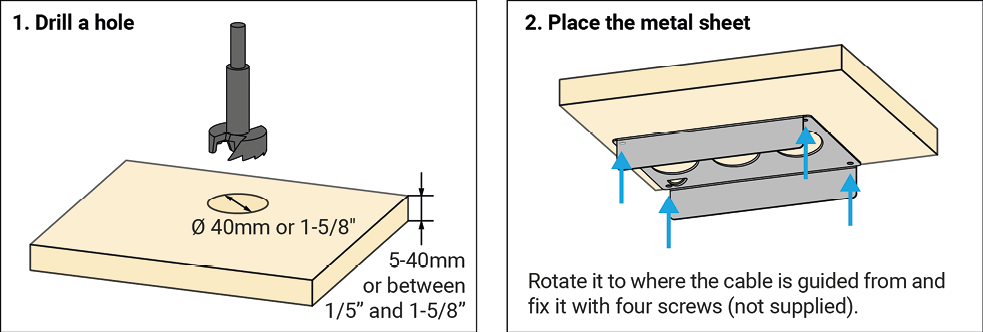
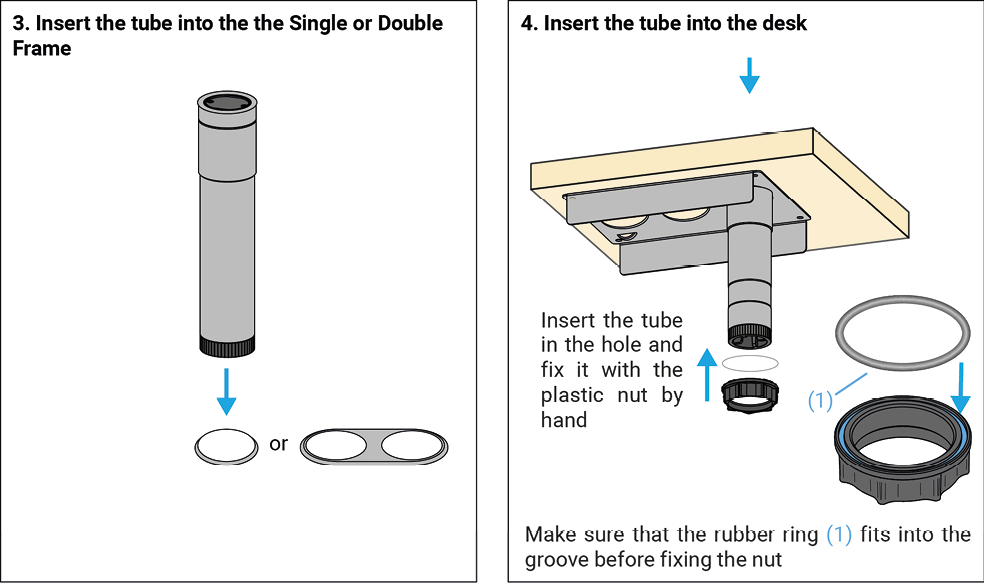
INFO:If you install the Cable PopUp with GPIO button(s), it is recommended to place the Cable PopUp into one of the holes at the edges, not into the middle one.
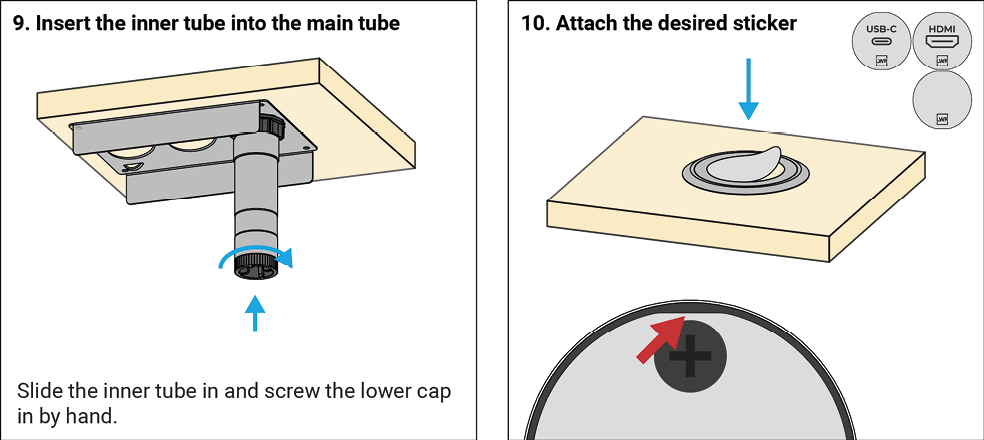
ATTENTION!Please take care of placing the sticker, especially when positioning the flattened sides as it sticks easily and hard to remove if it is in a wrong position.
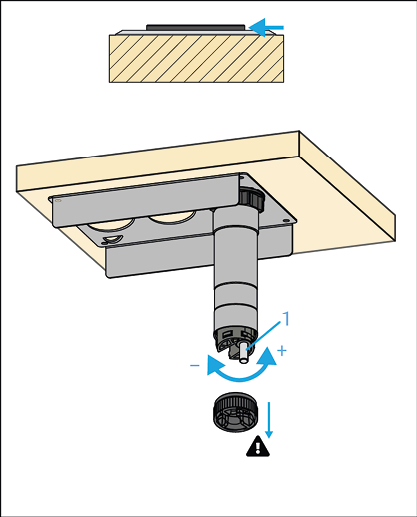
If the cap is not on the same level (higher or lower) as the outer ring, do the following:
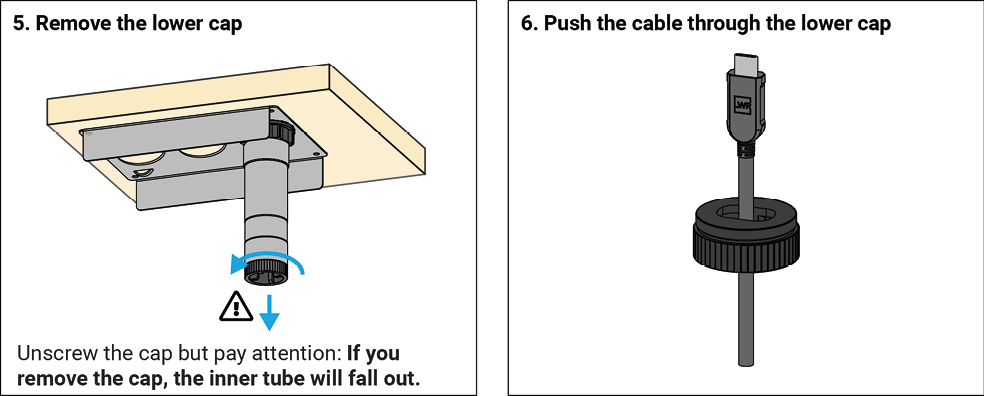
1.Remove the lower cap; pay attention: the inner tube may fall out!
2.Find the adjuster pin (1) at the bottom of the inner tube; turn it to change the height of the cap.
3.Screw the lower cap in by hand.
1. Close the Popup and install the Weight Pulley
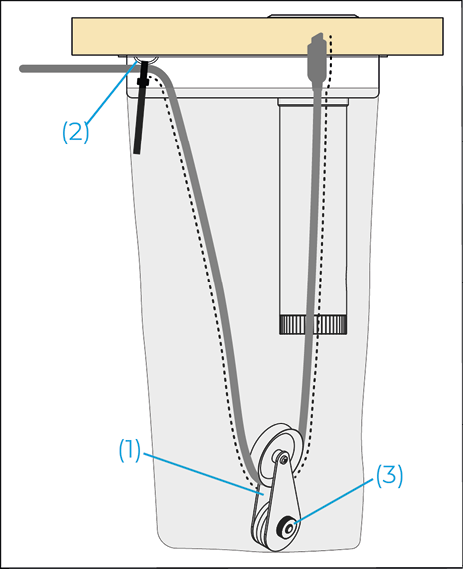
▪Put the cable in between the weight and the wheel (1).
▪The Weight pulley contains five discs as default. Suggested weights:
=3m USB-C cable (CAB-USBC-T300A): 5 discs
=2m HDMI cable (CAB-HDMI20-PHS200F): 3 discs
▪Set the necessary discs according to the desired retraction.
2. Fix the Cable and the Cable Bag - Temporarily
▪Fix the cable with the supplied Cable tie to the bridge (2) temporarily.
▪Fix the Cable bag temporarily.
3. Adjust the Cable Length
▪Allow a max. of 70 cm (cca. 28”) cable length from the bridge (dotted cable section).
▪When the Popup is in closed state, the Weight pulley must not pull the cable down. The cable shall be in a loose state.
4. Check the Retraction
▪Open the Popup and check the retraction.
▪If the cable was retracted too fast (the Weight pulley is too heavy), unscrew the nut (3), and remove the unnecessary discs.
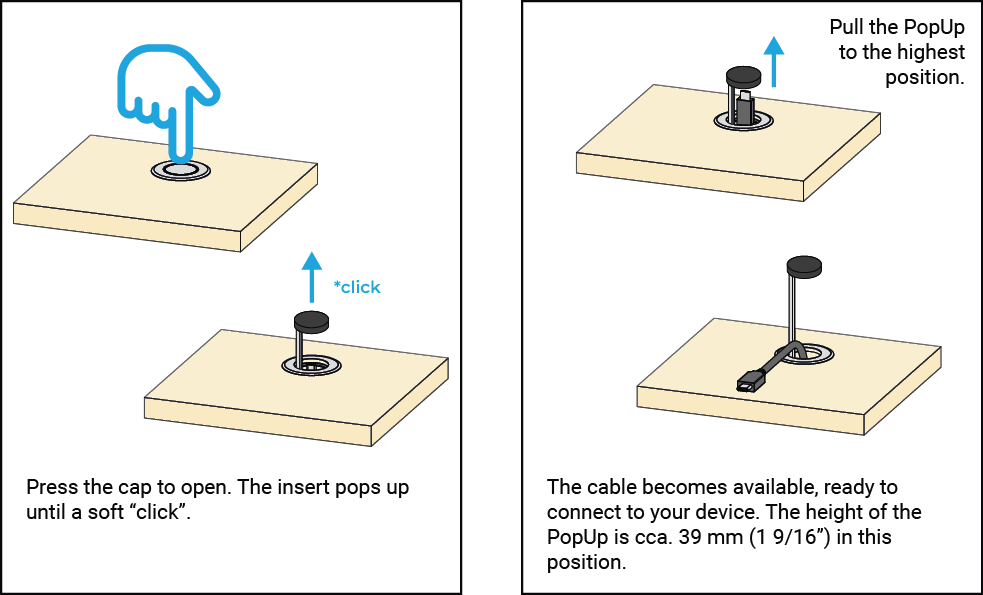
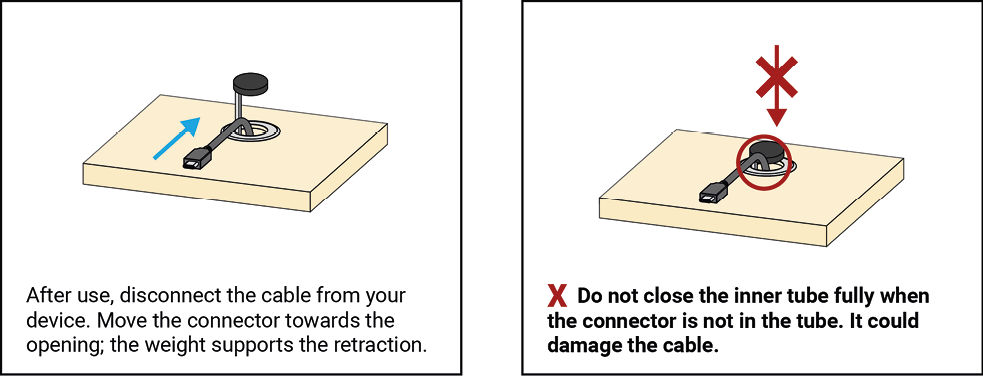
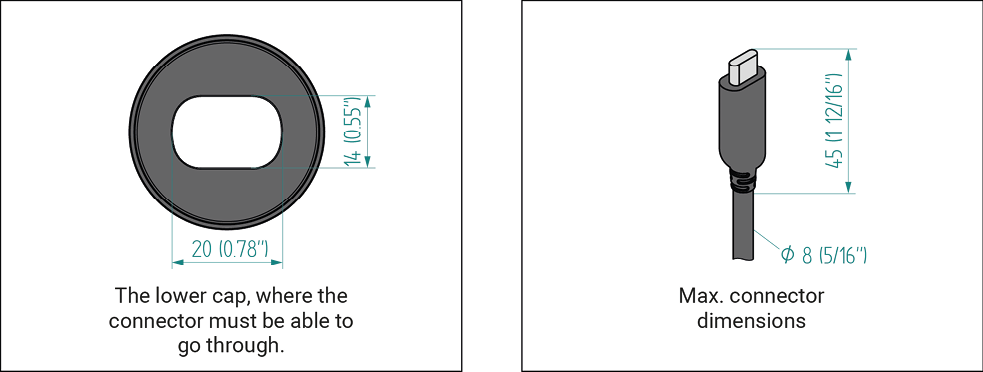
The Cable PopUp is compatible with the vast majority of commercially available USB-C cables as well as HDMI cables. However, the construction of C-PopUp-20RS has the following dimension limitations:
INFO:Specifications are subject to change without notice.
General
|
Compliance |
CE, UKCA |
|
RoHS |
EN 63000:2018 |
|
Electrical safety |
EN 62368-1:2020 |
|
Warranty |
3 years |
|
Operating temperature |
0° to +50˚C (+32° to +122˚F) |
|
Operating humidity |
10% to 90%, non-condensing |
Enclosure
|
Weight |
510 g (1.2 lb) |
|
Dimensions in mm |
49 (diam.) x 150 (height) |
|
Dimensions in inch |
1.93 (diam.) x 5.9 (height) |
|
Material |
Plastic, steel and anodized aluminum |

3.3. Further Document Information
Symbol Legend
The following symbols and markings are used in the document:
WARNING!Safety-related information that is highly recommended to read and keep in every case!
ATTENTION!Useful information for performing a successful procedure; it is recommended to read.
DIFFERENCE:Feature or function that is available with a specific firmware/hardware version or product variant.
INFO:A notice, which contains additional information. Procedure can be successful without reading it.
DEFINITION:The short description of a feature or a function.
TIPS AND TRICKS:Ideas that you may have not known yet, but can be useful.
Navigation Buttons
|
Buttons in the PDF version |
Buttons in the HTML version |
|||
|
|
Navigate to the Table of Contents. |
|
Open the main Table of Contents. |
|
|
|
Go back to the previous page. If you clicked on a link previously, you can go back to the source page by pressing the button. |
|
Navigate to the Online User Manuals webpage. |
|
|
|
Navigate to the Bookmark page. |
|
Navigate to the Bookmark page in this User Manual. |
|
|
|
Visit www.lightware.com. |
|
Download the PDF version of the User Manual. |
|


About Printing
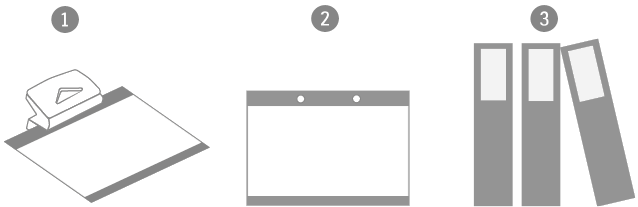
Lightware Visual Engineering supports green technologies and eco-friendly mentality. Thus, this document is made primarily for digital usage. If you need to print out a few pages for any reason, follow the recommended printing settings:
▪Page size: A4
▪Output size: Fit to page or Match page size
▪Orientation: Landscape
TIPS AND TRICKS: Thanks to the size of the original page, a border around the content (gray on the second picture below) makes it possible to organize the pages better. After punching holes in the printed pages, they can easily be placed into a ring folder.
3.4. Limited Warranty Statement
1. Lightware Visual Engineering PLC (Lightware) warrants to all trade and end user customers that any Lightware product purchased will be free from manufacturing defects in both material and workmanship for three (3) years from purchase unless stated otherwise below. The warranty period will begin on the latest possible date where proof of purchase/delivery can be provided by the customer. In the event that no proof can be provided (empty ‘Date of purchase’ field or a copy of invoice), the warranty period will begin from the point of delivery from Lightware.
1.1. 25G and MODEX product series will be subject to a seven (7) year warranty period under the same terms as outlined in this document.
1.2. If during the first three (3) months of purchase, the customer is unhappy with any aspect of a Lightware product, Lightware will accept a return for full credit.
1.3. Any product that fails in the first six (6) months of the warranty period will automatically be eligible for replacement and advanced replacement where available. Any replacements provided will be warranted for the remainder of the original unit’s warranty period.
1.4. Product failures from six (6) months to the end of the warranty period will either be repaired or replaced at the discretion of Lightware. If Lightware chooses to replace the product, then the replacement will be warranted for the remainder of the original unit’s warranty period.
2. The above-stated warranty and procedures will not apply to any product that has been:
2.1. Modified, repaired or altered by anyone other than a certified Lightware engineer unless expressly agreed beforehand.
2.2. Used in any application other than that for which it was intended.
2.3. Subjected to any mechanical or electrical abuse or accidental damage.
2.4. Any costs incurred for repair/replacement of goods that fall into the categories above (2.1., 2.2., 2.3.) will be borne by the customer at a pre-agreed figure.
3. All products to be returned to Lightware require a return material authorization number (RMA) prior to shipment, and this number must be clearly marked on the box. If an RMA number is not obtained or is not clearly marked on the box, Lightware will refuse the shipment.
3.1. The customer will be responsible for in-bound, and Lightware will be responsible for out-bound shipping costs.
3.2. Newly repaired or replaced products will be warranted to the end of the originally purchased product's warranty period.